
Automatic e-mail forwarding can be added to any e-mail. It can be used in cases where a person no longer works for your company, but you want to conveniently and easily forward their e-mails to another colleague, as well as in other cases.
Connect to you cPanel: Yourdomain.eu/cpanel
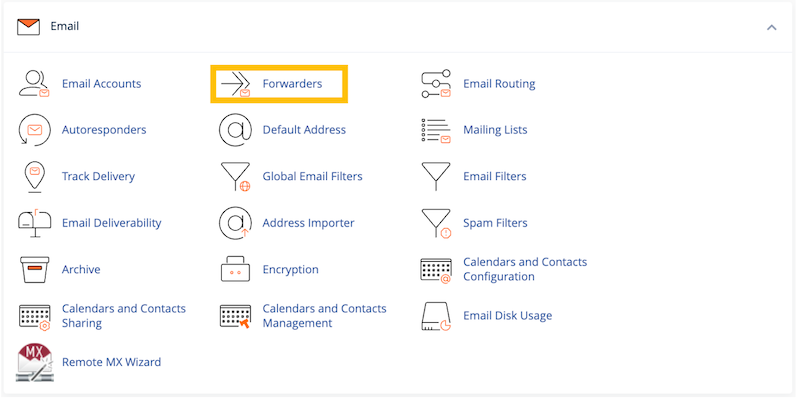
After logging into cPanel, select "Forwarders".
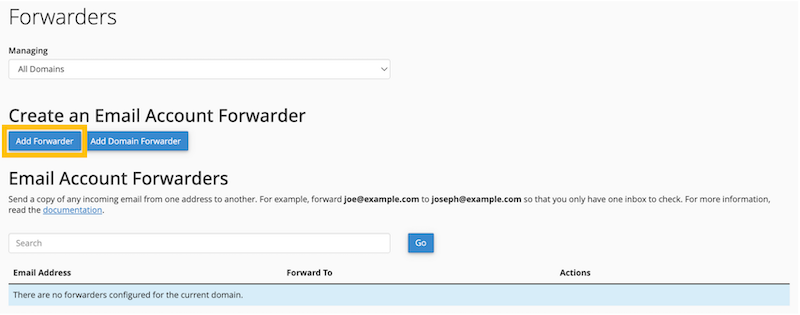
To start creating an email forwarding, click "Add forwarder".
Fill in the information about the email you want to forward and specify the email address you want these emails to be automatically forwarded to.
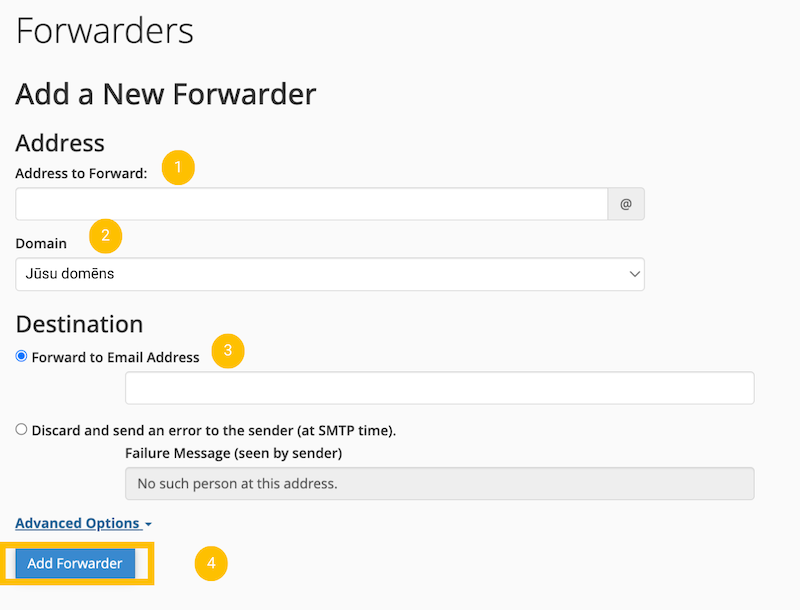
- Enter the e-mail address you want to forward to, followed by the @ sign, for example, marta.
- At this point, there is information about the email domain. If you have multiple domains, select the appropriate one.
- Enter the e-mail address here to which you want emails to be automatically forwarded.
- Click "Add Forwarder"
From now on, emails will be automatically forwarded to the email address you specified.
How to cancel automatic forwarding
If you want to remove the redirection, click "Delete" next to the redirection.

Click "Delete Forwarder" to confirm the deletion of the forwarding.

Video - How to add e-mail forwarder?


