To protect your website from cyberattacks, malware, and other security vulnerabilities, it is important to keep your system up to date. Software developers regularly release new versions that fix security issues, improve performance, and ensure compatibility with the latest technologies. Installing updates promptly significantly reduces the risk of your website becoming a target for attacks.
We recommend regularly updating:
- Content Management System (CMS) – such as WordPress, Joomla, Drupal, Magento, and others.
- Themes – to maintain security, stability, and compatibility with the latest system versions.
- Plugins and extensions – as outdated plugins are one of the most common sources of security vulnerabilities.
We also recommend reviewing your installed themes and plugins on a regular basis and removing any that are no longer in use or are no longer maintained by their developers. This helps keep your website secure, stable, and performing at its best.
We also recommend reviewing your website's security settings
How to do this for WordPress websites
- Log in to the Area IT Client Portal and open WordPress Toolkit.

In this example, updates are available for WordPress. You can also see that updates are required for the plugins and the theme. Install these updates first.
Once all updates have been completed, click Mitigate Vulnerabilities.

3. In this example, no security vulnerabilities have been identified. However, there are 15 recommended security measures available. Click Apply All to enable them.

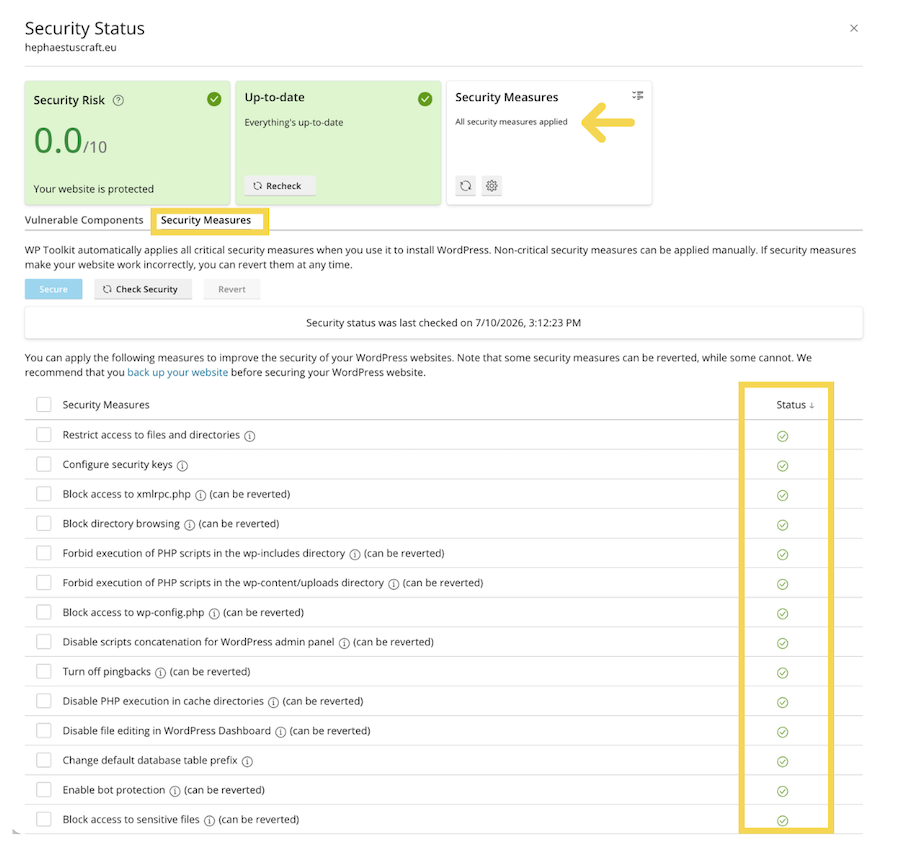
4. After the process is complete, open the Security Measures tab and verify that all security measures are active. Their status should be displayed in green.