
Through Area.lv's "Client Portal", you can log in to your client account, from which you can manage it. By logging in through the “Client Portal”, you gain access to manage your profile, access cPanel, emails, change various settings, restore your website from back-ups, and more.
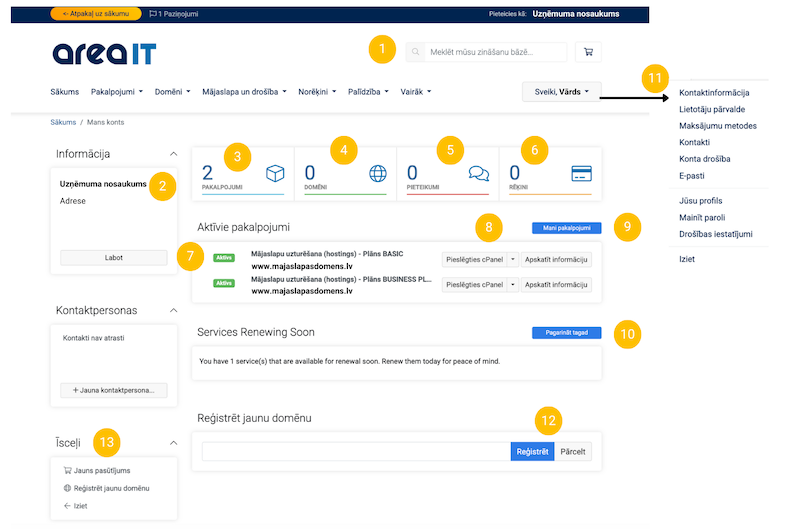
1. Search. Ability to enter a keyword or phrase of interest to find information, such as instructions, in the AreaIT Client Portal – Support section.
2. Ability to edit company / personal information – name, address, phone, payment method for AreaIT services, and other information about your company or yourself if you are registered as a private person.
3. Your purchased services – next payment date, service amount.
4. Information about domains registered with AreaIT. Your domain may be registered with NIC, GoDaddy, or another domain registrar. In that case, domains not registered with AreaIT will not appear here. You can transfer them to us to receive all services in one place.
5. If you have submitted support requests, questions, or similar to us, they are all located here. You can view historical requests as well as the status of each one.
6. Invoices. Here you can access all information about invoices – prepared and paid. Paid invoices can be downloaded.
7. Your chosen web hosting plan. Information about your selected web hosting plan. By clicking on it, you can get more information about the plan, as well as access other settings and data you can manage, including cPanel, emails, backups, MySQL® Databases, etc.
8. Here you can log in to cPanel for the specific service.
9. My Services – Access to invoices (same as point 5).
10. Renew Now. Ability to renew a service. You can do this in advance or take advantage of special offers if the end date of the service is approaching.
11. Information about your account. Here you can manage your AreaIT client account, change your password, company information, payment method, add or delete other users, and more.
12. Register a domain. Here you can check the availability of your desired domain, find out its price, and view alternative domain options. Additionally, through our system, you can quickly and easily purchase your chosen domain.
13. Shortcuts. Ability to register a domain (same function as point 11) or log out from your client portal.
Active Services
By clicking on your plan link (point 7 in the previous image, see above), you can access information about it as well as various shortcuts. It includes frequently used admin tools by our clients, as well as information about available and remaining disk space.
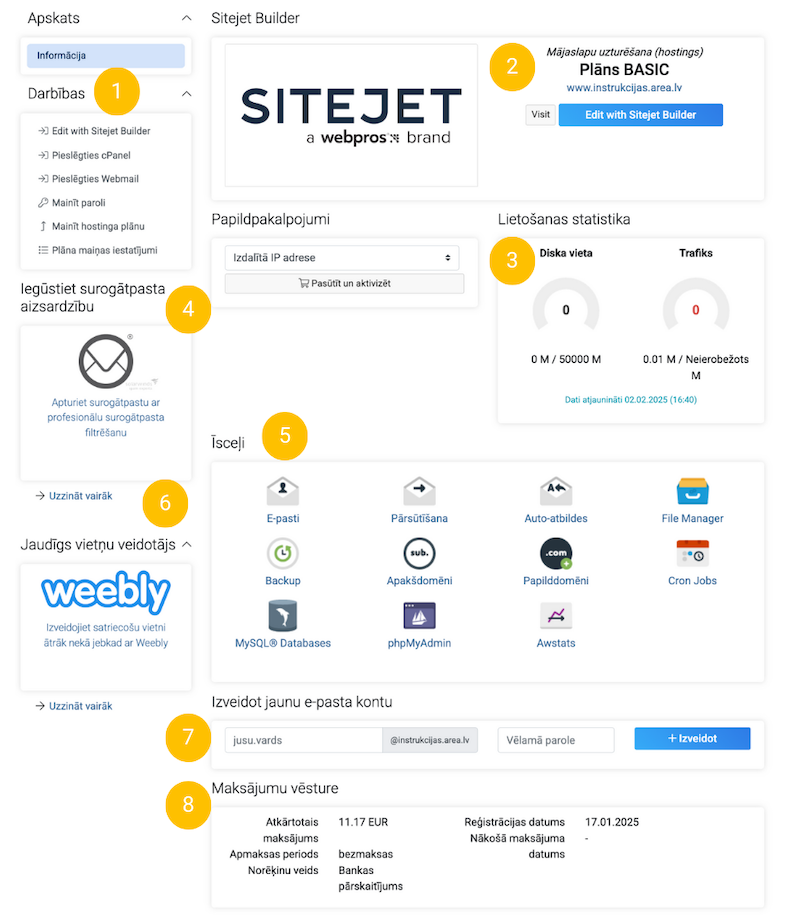
1. Actions
You can choose to access cPanel, create your website using Sitejet Builder, change your “Client Portal” password, or log in to create your website with Weebly.
Sitejet Builder – is an easy-to-use and intuitive website builder. It offers a wide range of ready-made website templates where you only need to replace images, text, and other details, and your website will be ready. This solution is ideal for small businesses, individuals, and those who want a fast, efficient, and affordable solution. Learn more about Sitejet Builder.
2. Shortcut to access Sitejet Builder.
3. Disk usage. Here you can see the used and available disk space for your service.
4. Spam protection. Protect yourself from receiving countless spam emails.
5. Shortcuts. Frequently used tools and services by our clients – access to emails, email forwarding, and auto-responders, as well as backups, subdomain creation, access to MySQL Databases, etc.
6. Weebly – is a similar tool to Sitejet Builder. It also offers an easy and fast way to create a website on your own.
7. Create a new email. Ability to quickly create a new email address.
8. Payment history. Information about recent invoices and payments made related to this service.


